
GitLab
GitLab Pipe
Section titled “GitLab Pipe”Similarly to GitHub Pipe, GitLab Pipe adds a comment with a summary of a run to a Merge Request:
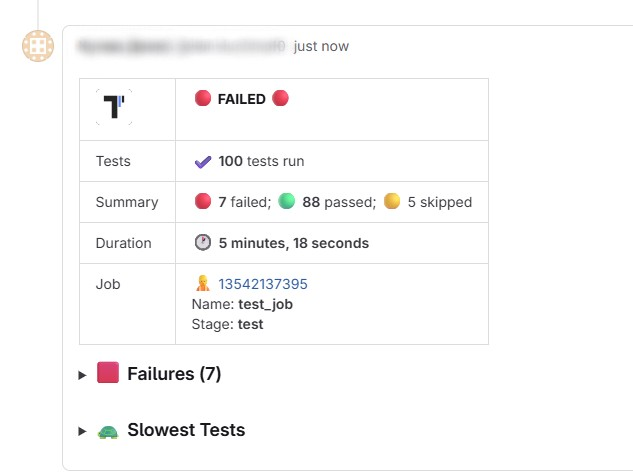
This summary contains:
- Status of a test run
- Number of failed, passed, and skipped tests
- Stack traces of failing tests (first 20)
- Screenshots of failed tests (if available)
- List of 5 slowest tests
To enable GitLab pipe set GITLAB_PAT environment with a GitLab access token.
GitLab Token Requirements
Section titled “GitLab Token Requirements”Use either a Personal Access Token or a Project Access Token with api scope.
In GitLab CI/CD variables, make sure:
GITLAB_PATis available in pipelines where Merge Requests are executed- The variable is not restricted only to protected branches if your Merge Request pipelines run on unprotected branches
.gitlab-ci.yml Example
Section titled “.gitlab-ci.yml Example”Use Merge Request pipelines, as GitLab pipe requires MR context (CI_MERGE_REQUEST_IID and CI_PROJECT_ID).
stages:  - test
tests:  stage: test  image: node:20  rules:    - if: '$CI_PIPELINE_SOURCE == "merge_request_event"'  script:    - npm ci    - npx playwright install --with-deps chromium    - GITLAB_PAT=$GITLAB_PAT TESTOMATIO=$TESTOMATIO npx playwright test
Keep Outdated Reports
Section titled “Keep Outdated Reports”By default, when the same pipeline is re-run, previous Testomat.io comment is removed.
To keep old reports, set GITLAB_KEEP_OUTDATED_REPORTS=1.
script: - npm ci - GITLAB_KEEP_OUTDATED_REPORTS=1 GITLAB_PAT=$GITLAB_PAT TESTOMATIO=$TESTOMATIO npx playwright testRemove All Outdated Reports
Section titled “Remove All Outdated Reports”By default, only the latest previously created Testomat.io report is removed.
To remove all previous reports from the same job, set GITLAB_REMOVE_ALL_OUTDATED_REPORTS=1.
script: - npm ci - GITLAB_REMOVE_ALL_OUTDATED_REPORTS=1 GITLAB_PAT=$GITLAB_PAT TESTOMATIO=$TESTOMATIO npx playwright test